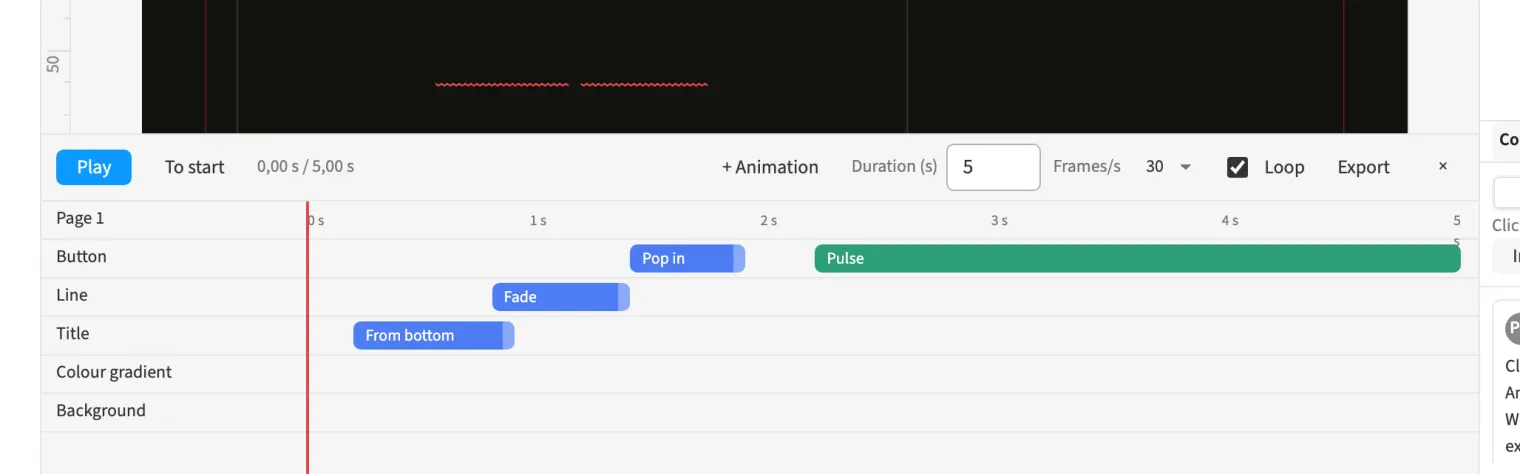
Where to find itWindow › Animation › Timeline (⌥⌘T)
The timeline assigns animations to objects on the current page. Combine ins, outs and loops, or set custom keyframes for offset, size, rotation and opacity. For an animated agency ad, let the headline appear first, followed by the product and then the call to action. Start and duration determine the sequence, and the playhead displays the current state on the page. Play the motion and adjust it before export. Video and animated HTML use the movement defined in the timeline.
How to do it
- Open «Window › Animation › Timeline».
- Select an object on the page.
- Use «+ Animation» to add an in, out or loop.
- Adjust the clip’s start and duration.
- Review the sequence with «Play».
Tips
- Use ⌥⌘T to open or close the timeline.
Compared
Timeline and video (MP4)
- Medusa availableMP4, WebM, animated HTML
- Adobe InDesignanimation for EPUB and interactive PDF↗ Adobe: Animate documents with motion presets
- QuarkXPressHTML5 animation↗ Quark: QuarkXPress / Digital Publishing
- Affinity Studio no reliable statement
Vendor sources, as of 25.9.2026 · Full comparison with all sources